
You merge two orders, ship one parcel, and everything looks fine - until you open the product page and see 2 units still sitting in Committed. Nothing is on the way to anyone. The stock is on your shelf, but Shopify thinks it is spoken for.
That is the single most common inventory complaint about order merging, and it has one cause: the original orders were never fulfilled. Here is how the numbers actually move.
The short answer: Merging never touches your stock. The original orders hold the committed inventory until they are fulfilled - so the original orders have to be fulfilled too. MergeIt does that for you automatically when you fulfill the merged order, which is the default setting.
Shopify's Three Stock Numbers, in Plain English
Before the merge part makes sense, these three have to be clear:
| Number | What it means | When it changes |
|---|---|---|
On hand | Units physically in your warehouse right now | Drops when you fulfill an order (the box actually leaves) |
Committed | Units already sold but not shipped yet | Goes up when an order comes in, down when that order is fulfilled or cancelled |
Available | What you can still sell (on hand minus committed) | Drops the moment an order comes in |
The key one is committed. It is attached to an order, not to a product. As long as an unfulfilled order exists, its units stay committed. That is true for every Shopify store, with or without any app.
What a Merge Does to Those Numbers
Watch one product through a full merge. Elena orders the same razor twice, ten minutes apart, and you merge both orders into one:
The same thing as a table:
| Moment | On hand | Available | Committed |
|---|---|---|---|
Before anything happens | 10 | 10 | 0 |
Order #1051 comes in (1 razor) | 10 | 9 | 1 |
Order #1054 comes in (1 razor) | 10 | 8 | 2 |
MergeIt merges them into #1055 (test order) | 10 | 8 | 2 |
You fulfill #1055 and ship one parcel | 10 | 8 | 2 |
MergeIt fulfills #1051 and #1054 | 8 | 8 | 0 |
Two rows are worth staring at:
- The merge row changes nothing. By default the merged order is created as an order in test mode, so it commits no stock of its own - and it does not need to. Both razors were already committed by #1051 and #1054 the moment those orders came in. Creating an order is not what moves your stock a second time, which is why merging cannot oversell you.
- Only fulfilling moves stock. Fulfilling the merged order alone would not fix your numbers either, because the merged order is not what holds them. The original orders are. Fulfilling them is the step that releases the commitment and takes the two units off your shelf - the last row in the table.
The Setting That Releases Your Committed Stock
You will find it in Settings → Original Orders. Two cards, and together they decide everything about your stock after a merge:
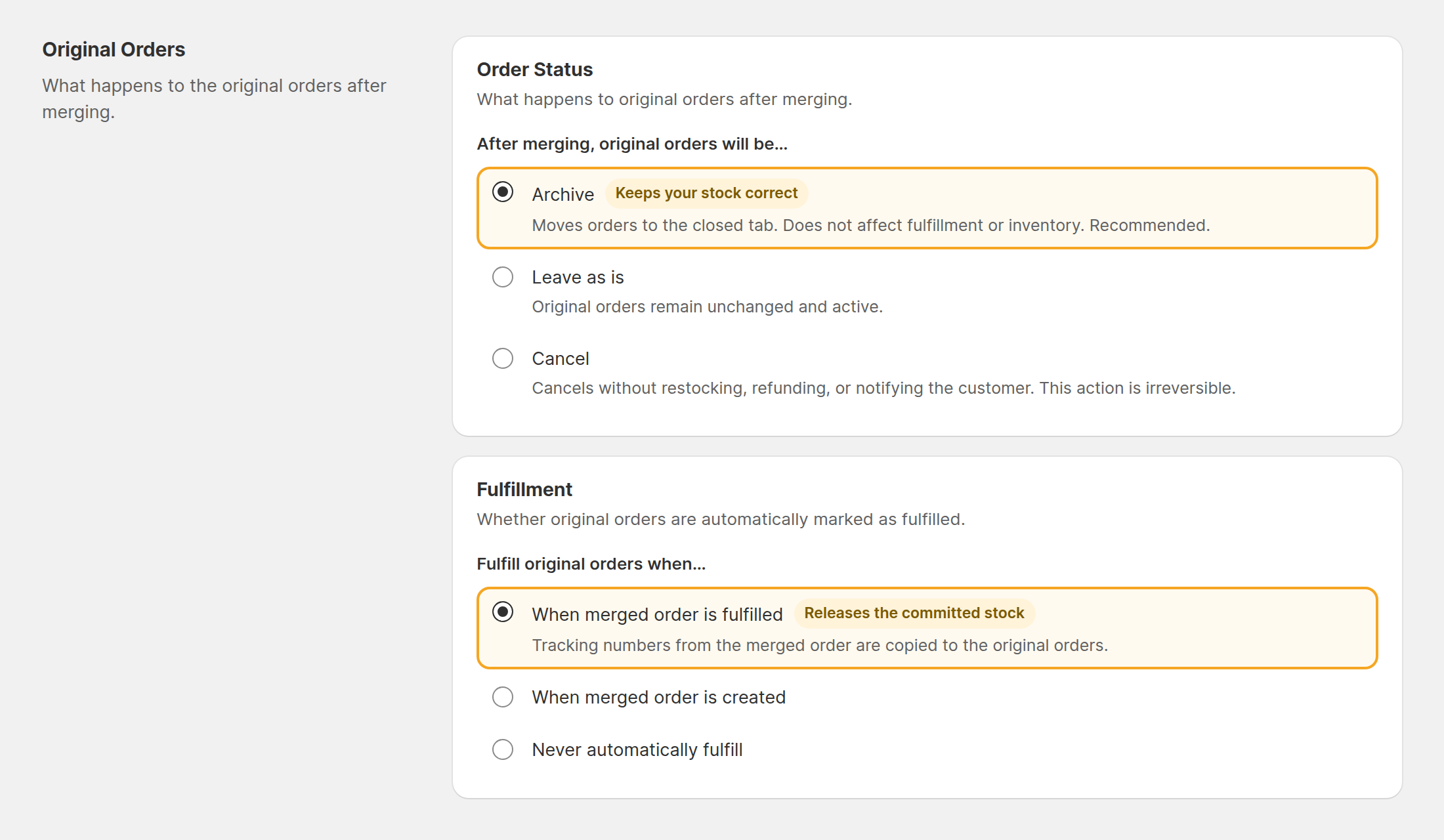
Fulfillment is the one that matters for inventory:
| Fulfill original orders when… | What you see in your inventory |
|---|---|
When merged order is fulfilled (default) | ✅ Committed clears itself the second you ship. The tracking number is copied to the originals too, so every record matches. |
When merged order is created | ✅ Committed clears at merge time. Numbers are right, but the originals say "Fulfilled" before the parcel has left your desk. |
Never automatically fulfill | 🚨 Committed never clears on its own. You have to fulfill both originals by hand, every single time. |
Order Status decides what happens to the originals themselves:
- Archive (recommended) - moves them to the closed tab. It does not touch fulfillment or inventory, and you can still undo the merge.
- Leave as is - the originals stay open and keep showing up in your unfulfilled list.
- Cancel - also frees the committed stock, and nothing is restocked (correct: those units are in the parcel). But cancelling is irreversible and the merge can no longer be undone, so only pick it if your workflow really needs it.
The Failure Mode Worth Knowing About
If original orders are left unfulfilled after a merge, three things follow, and merchants report all three:
- Phantom committed stock. Units show as committed forever. Your available count stays lower than reality, so you stop selling things you actually have.
- A false picture of what is on the shelf. On hand still counts the units you already shipped, because nothing ever recorded them leaving.
- Sales channels acting on their own. Channels like Facebook or Instagram only ever see the original order. An order that sits unfulfilled long enough can get auto-cancelled by the channel - and that cancellation can pull money back out of your account for a parcel you already shipped.
None of this happens because merging is dangerous. It happens because an unfulfilled order is, to Shopify and to every sales channel, an order that still owes someone a package. Fulfilling the originals is what closes the loop, and leaving that setting on default is all it takes.
Check It On Your Own Store in Five Minutes
Do not take anyone's word for it, including mine. Run it once:
- Pick a tracked product and note its on hand, available and committed numbers.
- Place two test orders for that product from the same customer.
- Merge them in MergeIt. Check the product again - the numbers should be exactly the same as right after the two orders came in.
- Fulfill the merged order.
- Check the product one last time: committed should be back to where it started, and on hand should have dropped by the number of units you actually shipped.
If step 5 looks right, your setup is correct and you never have to think about this again.
FAQ
Does merging two Shopify orders deduct my inventory twice? No. The stock was already committed when the original orders were placed, and the merged order does not commit it a second time. The two original orders keep holding the stock until they are fulfilled, so every unit is counted exactly once.
Why do my original orders still show committed inventory after a merge? Committed stock stays on an order until that order is fulfilled or cancelled. If the original orders are only archived and never fulfilled, they keep holding the commitment forever. MergeIt fulfills them for you as soon as the merged order is fulfilled, which releases the committed stock automatically.
Do I have to fulfill the original orders myself after merging? Not with the default setting. In MergeIt, Settings → Original Orders → Fulfillment is set to "When merged order is fulfilled", so the original orders are marked as fulfilled the moment you fulfill the merged order, and the tracking number is copied to them. If you switch that setting to "Never automatically fulfill", you have to fulfill them by hand or their committed stock is never released.
Should I cancel or archive the original orders after merging? Archive is the safer default: it moves the originals to the closed tab without touching fulfillment or inventory, and the merge can still be undone. Cancelling also frees the committed stock, but it cannot be undone, so only use it if your workflow really needs the originals cancelled.
🎯 Key Takeaways
- ✓ Committed stock belongs to the original orders, not to the merged order - merging itself moves nothing
- ✓ Every unit is deducted exactly once, so a merge can never oversell you
- ✓ The original orders must be fulfilled as well, or their committed stock is never released
- ✓ MergeIt does that automatically by default, and copies the tracking number to the originals
- ✓ Archive the originals rather than cancelling them - same inventory result, and the merge stays undoable
New to merging? Start with how order merging works, or see the three ways to combine orders on Shopify.